Free Resource
Shadow AI Governance Toolkit
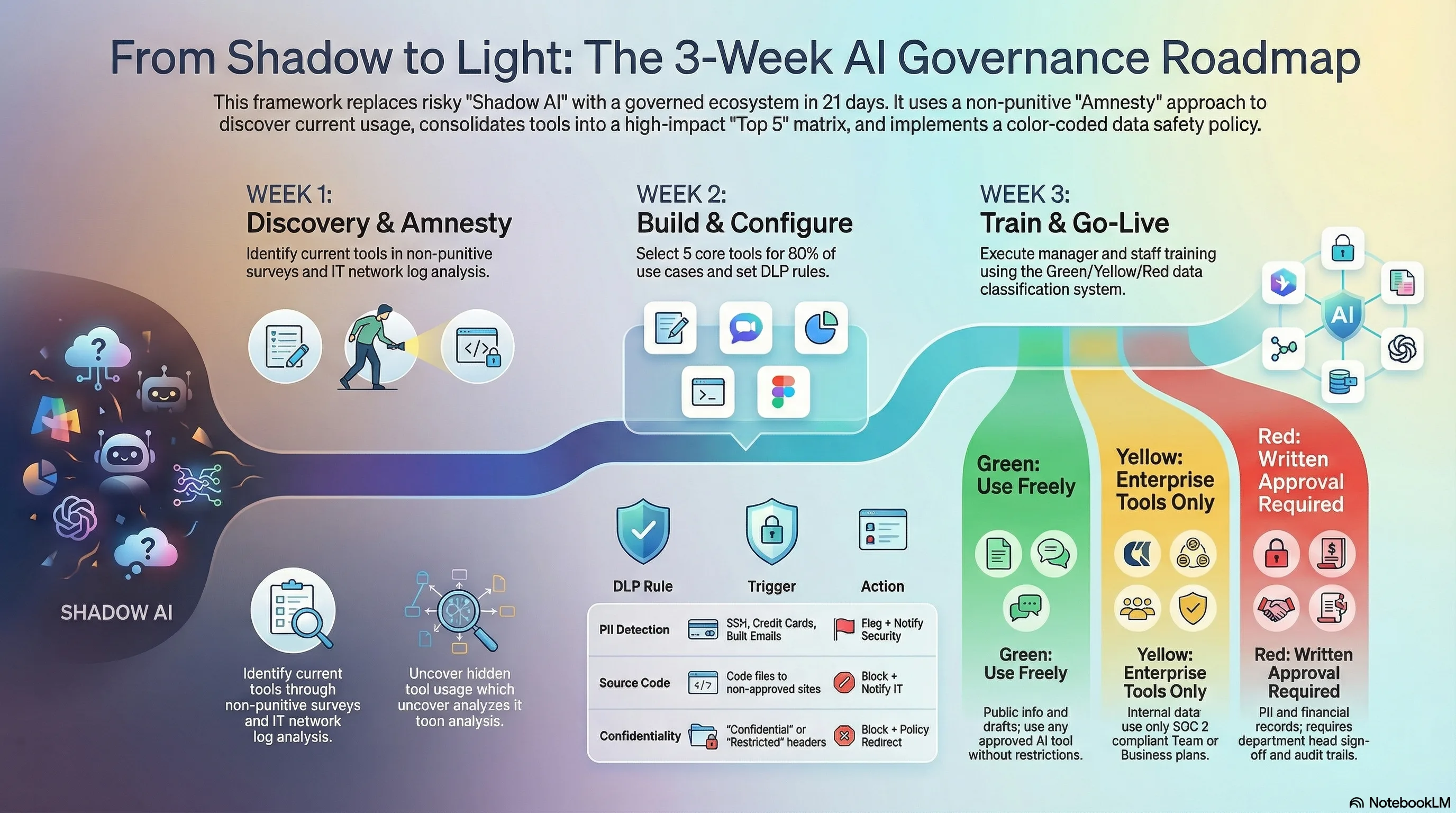
The complete framework I use with clients to channel shadow AI usage in 3 weeks. Templates, scripts, training outlines, and policy documents -- everything you need to go from zero visibility to full governance.
Shadow AI Amnesty Audit Template
Send this to all employees during Week 1. The amnesty framing is critical -- punitive language kills participation. One client got 94% response rate with this exact wording.
Employee AI Usage Disclosure Form
We're building an AI toolkit for the company. To make sure we choose the right tools, we need to understand what's already working. This is a no-penalty disclosure -- we want to learn from your experience, not restrict it.
1. What AI tools do you currently use for work?
List all tools (ChatGPT, Claude, Copilot, Midjourney, browser extensions, etc.)
2. What tasks do you use them for?
(Content writing, code review, data analysis, research, email drafting, meeting notes, etc.)
3. How often do you use each tool?
(Daily / Several times per week / Weekly / Occasionally)
4. Are you using a personal account or company account?
5. Roughly how much time does this save you per week?
6. What types of data do you typically share with AI tools?
(Public info / Internal docs / Customer data / Source code / Financial data)
7. What AI tool do you wish the company officially supported?
IT Discovery Checklist
Run this in parallel with the amnesty audit. Employees won't report everything -- network logs fill the gaps.
Network & Endpoint Analysis
Proxy/Firewall Log Domains to Search:
*.openai.com # ChatGPT, DALL-E, API
*.anthropic.com # Claude
*.google.com/ai* # Gemini
*.cohere.ai # Cohere models
*.huggingface.co # Open-source models
*.replicate.com # Model hosting
*.midjourney.com # Image generation
*.perplexity.ai # AI search
*.jasper.ai # AI writing
*.copy.ai # AI copywriting
*.cursor.sh # AI code editor
*.replit.com # AI code assistant
*.otter.ai # Meeting transcription
*.fireflies.ai # Meeting transcription
Browser Extension Audit Keywords:
Search managed browser extension lists for: AI, GPT, assistant, copilot, writer, summarize, transcribe
Finance Audit:
Pull expense reports and corporate card transactions containing: OpenAI, Anthropic, Jasper, Copy.ai, Midjourney, Otter, Fireflies, Cursor, Replit, Perplexity
Approved AI Toolkit Matrix
Use this as your starting point for Week 2. The goal is to cover 80% of use cases with 5 or fewer tools. Consolidating tools reduces cost, simplifies security, and makes training easier. Vendors will cut 40-60% on enterprise agreements when you consolidate licenses.
General AI Assistant
FOUNDATION TOOLRecommended (in order):
SOC 2 compliant on Team/Business plans. No training on your data. This is your most important choice -- it will also serve as your document analysis and potentially image generation tool.
Every business is different. Your industry, existing tech stack, compliance requirements, and team size all affect which tool is the best fit. Use the General AI Assistant Checklist to evaluate which option works for your situation.
Code Assistant
DEV TEAMS ONLYRecommended (in order):
Price is the biggest variable here. Costs range from usage-based to $40+/user/month depending on the tool and plan. No code sent to third parties on enterprise plans, local processing available on some.
Every business is different. Your language stack, repo size, security posture, and budget all matter. Pricing models vary significantly between tools. Use the Code Assistant Checklist to figure out which fits your team and budget.
Document Analysis
REUSE OPPORTUNITYRecommended (in order):
Keep your tool count low. Whichever General AI Assistant you chose above likely handles document analysis well. Perplexity adds source citations if research-heavy workflows are a priority. There are many other good options, but every new tool is another license, another security review, and another training session.
Every business is different. Your document types, compliance needs, and volume should drive this decision. Use the Document Analysis Checklist to evaluate whether you need a dedicated tool or can reuse what you have.
Image Generation
REUSE OPPORTUNITYRecommended (in order):
Reuse first. ChatGPT and Gemini both have image generation built in. If your team needs higher-fidelity creative output, MidJourney is the next step. Commercial usage rights on all recommended options.
Every business is different. Your creative volume, brand guidelines, and quality bar all affect this choice. Use the Image Generation Checklist to decide if the built-in option is enough or if you need a specialist tool.
Meeting Transcription
CHECK EXISTING TOOLSRecommended (in order):
There are many good transcription tools, but check what you already have first. Zoom, Teams, and Google Meet all have built-in AI transcription and summaries now. If your General AI Assistant supports it, use that. Only add a dedicated tool if your existing stack falls short. Critical: validate the Enterprise Data Protection policy of any transcription tool -- meetings often contain sensitive data.
Every business is different. Your meeting platform, recording policies, and data sensitivity requirements should guide this choice. Use the Meeting Transcription Checklist to audit what you already have before adding another tool.
The 80% rule: These 5 use cases cover the vast majority of what your team needs. There are hundreds of AI tools on the market, but every tool you add is another license to manage, another security review, and another training burden. Start here, measure adoption, and expand deliberately. If you want to go deeper on any of these categories, review the Use Case Checklists for a structured evaluation framework.
Negotiation tip: Contact vendors directly and reference that you're consolidating from multiple individual accounts to one enterprise agreement. Most will offer annual discounts of 40-60% to close the deal.
Data Classification Policy for AI Usage
Print this. Hang it in every team area. Make it the first slide of every AI training session. Simplicity drives compliance -- three colors, three rules.
- Public information
- Marketing copy and blog drafts
- General research questions
- Code from open-source projects
- Meeting agenda planning
- Email drafting (non-sensitive)
Rule: Any approved tool. No restrictions.
- Internal process documentation
- Non-sensitive business data
- Aggregated (anonymized) metrics
- Internal presentations
- Product feature brainstorming
- Competitive analysis
Rule: Enterprise-grade tools only (Team/Business plans). No personal accounts.
- Customer PII or data
- Financial records
- Strategic plans and roadmaps
- Proprietary source code
- Legal documents
- Employee records
Rule: Written approval from department head + IT. Full audit trail required.
DLP Rules for AI Traffic
Configure these in your existing DLP system (Microsoft Purview, Symantec, Forcepoint, etc.). Flag first, block later. Blocking on day one creates workarounds -- flagging gives you visibility while you build trust.
Recommended DLP Rules
Rule 1: PII Detection on AI Domains
Trigger: SSN patterns (XXX-XX-XXXX), credit card numbers (16-digit), email addresses in bulk (10+)
Action: Flag + notify security team. Do not block.
Scope: All AI-related domains from the discovery checklist
Rule 2: Source Code Exfiltration
Trigger: Files with extensions .py, .js, .ts, .java, .go, .rb sent to non-approved AI domains
Action: Block + notify both user and IT
Exception: Approved code assistants (GitHub Copilot, Cursor Team)
Rule 3: Confidential Document Upload
Trigger: Documents containing "Confidential," "Internal Only," or "Restricted" in headers/footers
Action: Block + redirect to policy page explaining approved alternatives
Rule 4: Bulk Data Transfer
Trigger: CSV, XLSX, JSON files over 1MB sent to any AI endpoint
Action: Flag + require manager approval within 24 hours
Training Session Outlines
Two sessions cover the entire organization. Run the manager session first -- they need to model the behavior before their teams get trained.
Manager Training
2 hours | Run first
- Why shadow AI happens (15 min)
Employees trying to be productive, not malicious. Show the 75%/78% stats. - The real risks (20 min)
Data leaks, compliance fines, IP exposure. Use the $200K breach cost stat. - How to spot shadow AI (15 min)
Sudden productivity jumps, new expense line items, unfamiliar browser extensions. - Response framework (20 min)
Educate, don't punish. Redirect to approved tools. Escalate only for Red data. - The approved toolkit walkthrough (30 min)
Live demo of each approved tool. Show managers how to use them first. - Q&A + scenarios (20 min)
Walk through 5 real scenarios. "What do you do when..." format.
Individual Contributor Training
1 hour | Run after managers
- Your approved tools (15 min)
Here's what you have access to. Here's how to get accounts set up. - Getting the most out of them (15 min)
Top 5 prompts per tool for your department. Live examples. - The Green/Yellow/Red system (10 min)
What data goes where. When in doubt, ask. No penalties for asking. - What NOT to do (10 min)
No customer data in personal accounts. No uploading confidential docs. No shadow extensions. - Who to contact + Q&A (10 min)
AI help desk contact. How to request new tools. Feedback channel.
Rollout Communication Scripts
Copy, customize, send. Tone matters -- these are written to build buy-in, not compliance fear.
Week 1: Amnesty Announcement (All-Hands or Email)
"Team -- we're going all-in on AI. Not banning it. Embracing it."
"Over the next three weeks, we're building an official AI toolkit that gives everyone access to powerful, secure AI tools. To make sure we pick the right ones, I need your help."
"Starting today, we're running a two-week AI usage survey. This is a no-penalty disclosure. I don't care what you've been using -- I care about what's been working. Your input directly shapes which tools we officially support."
"Please fill out the survey by [DATE]. The more honest you are, the better your toolkit will be."
Week 2: Toolkit Announcement
"Thanks to everyone who participated in the AI survey. We heard you."
"Based on your feedback and our security review, here are the official AI tools now available to the entire team: [LIST TOOLS]. Accounts are being provisioned this week -- you'll get setup instructions by [DATE]."
"These tools cover the use cases you told us about. They're enterprise-grade, meaning your data stays private and we maintain compliance. If you need something that isn't on the list, there's a request process -- we'll evaluate new tools quarterly."
Week 3: Training + Go-Live
"Your AI training sessions are scheduled for [DATES]. Attendance is required -- but I promise it's the most useful hour you'll spend this month."
"You'll learn exactly how to get the most out of your new tools, including specific prompts for your role. You'll also learn the simple Green/Yellow/Red system for knowing what data is safe to use with AI."
"After training, you're free to use approved tools without restrictions for Green and Yellow data. Questions? Reach out to [AI HELP DESK CONTACT]."
The 3-Week Deployment Timeline
This is the same timeline I use with clients. It's tight but realistic. The key: run IT discovery and the amnesty audit in parallel during Week 1.
Week 1: Discovery
Days 1-2
- - IT/Security/HR alignment meeting
- - Send amnesty audit to all employees
- - IT begins network log analysis
Days 3-5
- - Finance pulls AI-related expenses
- - Collect and analyze survey responses
- - Identify top shadow AI tools in use
Week 2: Build
Days 1-3
- - Select and approve toolkit (use matrix above)
- - Negotiate enterprise licenses
- - Configure DLP rules (flag mode)
Days 4-5
- - Provision accounts for all employees
- - Create data classification poster
- - Prepare training materials
Week 3: Deploy
Days 1-3
- - Run manager training sessions
- - Send toolkit announcement
- - Run IC training sessions
Days 4-5
- - Go live with approved tools
- - Monitor DLP flags (first 48 hours are critical)
- - Establish AI help desk channel
Need Help Deploying This?
This framework has been implemented across organizations of all sizes -- from 50-person startups to 5,000-employee enterprises -- and consistently turns shadow AI from a risk into a competitive advantage. If you want hands-on help running the audit, selecting tools, or training your team, let's talk.
Read the full breakdown: Shadow AI: The Hidden Cost (And How to Fix It)