Shadow AI: The Hidden Cost (And How to Fix It)
Shadow AI surged 250%, adding $200K to breach costs. Here's the framework that channels employee AI use without killing innovation.

Your marketing manager is uploading customer data to ChatGPT. Your sales team shares contracts with Claude. Someone in finance just connected QuickBooks to a sketchy AI assistant they found on Product Hunt.
You don’t know about any of it.
That’s shadow AI—employees using AI tools without IT approval or oversight. And it’s not a fringe problem. 75% of workers use AI at work. 78% bring their own tools. Microsoft’s research confirmed it last month.
The $200,000 Problem in Your Browser Tabs
Here’s what shadow AI actually costs when it goes wrong.
IBM’s 2026 Cost of a Data Breach Report found that 20% of breaches now involve shadow AI usage, adding an average of $200,000 to breach costs. That’s not counting the compliance fines. California’s AI regulations alone can hit you for $50,000 per violation. Texas just passed similar laws. New York’s coming next quarter.
Netskope tracked 223 AI-related security incidents per month in average organizations. Not per year. Per month.
And here’s the kicker: 47% of GenAI users use personal accounts their companies can’t oversee. Your intellectual property is sitting in someone’s personal ChatGPT history right now.
Why Blanket Bans Backfire Every Time
I watched a Fortune 500 client ban all AI last year. Complete ban. All AI tools blocked at the firewall. Violation meant termination.
Three months later, their security team found 400+ employees using AI through personal devices and mobile hotspots. The ban didn’t stop AI usage—it pushed it completely underground. Now they had zero visibility and zero control.
Zendesk’s 2026 report shows shadow AI usage increased 250% year-over-year in some industries. You know what correlates perfectly with that surge? Companies issuing AI bans.
Your employees will use AI. The only question is whether they’ll do it with your knowledge or behind your back.
The Real Cost Isn’t the Tools—It’s the Chaos
Last month, I audited a 200-person SaaS company’s AI usage. Here’s what I found in one week:
17 different AI tools actively used:
- 6 for content creation
- 4 for code assistance
- 3 for data analysis
- 4 random Chrome extensions
Monthly burn rate: $8,400 across personal and department cards
Compliance violations: 14 instances of customer data in AI prompts
Duplicated spend: 3 departments paying for ChatGPT Team separately
But the real damage? Their product roadmap—the entire Q1/Q2 strategy document—was sitting in a junior developer’s personal Cursor IDE account. He’d uploaded it to debug some planning software. That document contained technical specifications worth roughly $2M in development investment.
The Framework That Actually Works
I’ve implemented this system at 12 companies in the last six months. It channels AI usage instead of blocking it. Average time to deployment: 3 weeks. Average reduction in shadow AI: 84%. This approach builds on proven AI implementation principles that bridge the gap between tools and results.
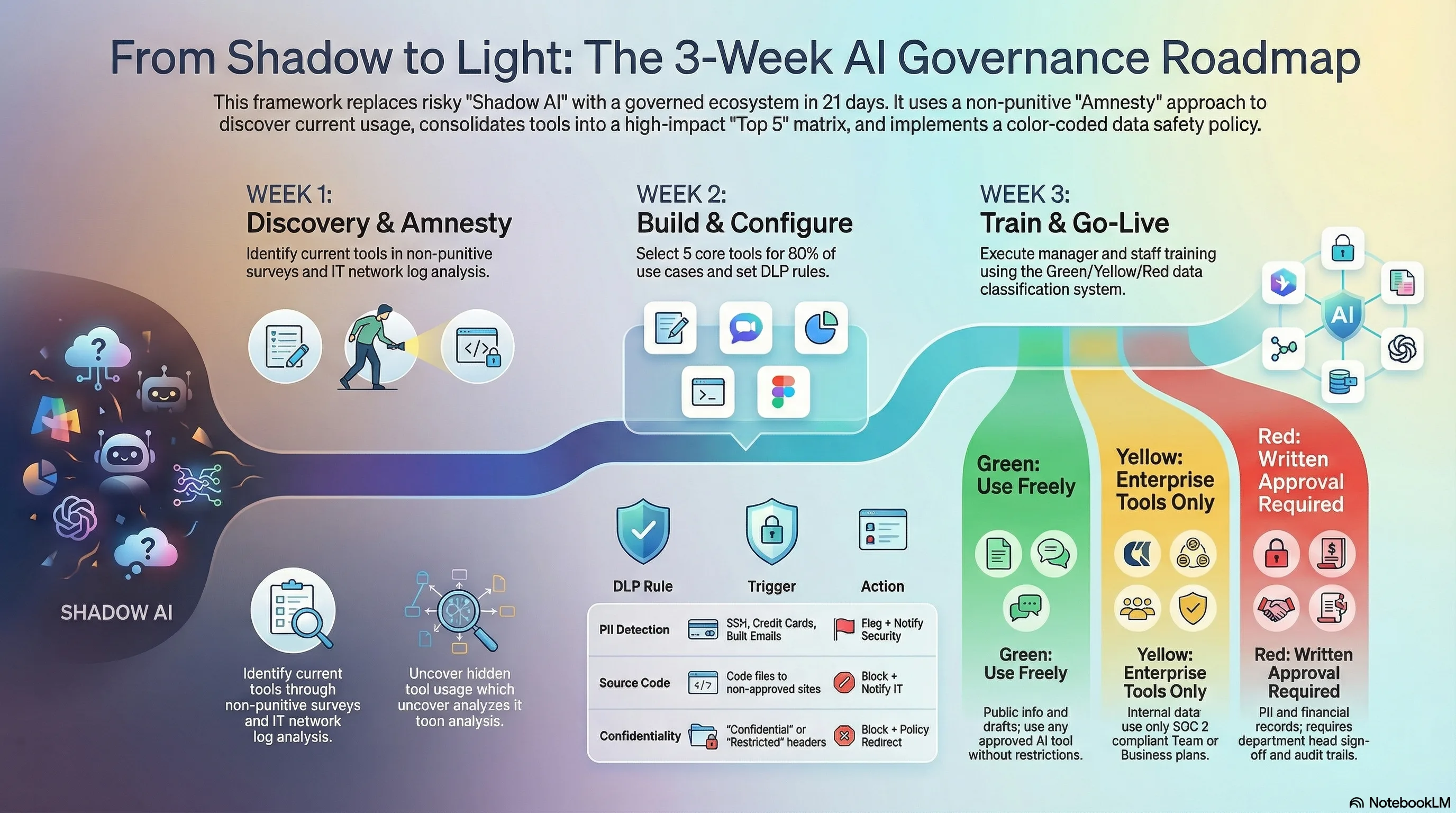
Week 1: Map the Underground
You can’t manage what you can’t see. Start with amnesty.
The Amnesty Audit Process:
- Announce a two-week “no-penalty disclosure period”
- Have employees fill out a simple form: What AI tools do you use? What for? How often?
- IT runs network traffic analysis for AI endpoints (OpenAI, Anthropic, Google, etc.)
- Finance pulls all SaaS expenses for AI-related charges
One client discovered 47 AI tools in active use. They thought they had 3.
Quick Discovery Script for IT Teams:
Look for these domains in your proxy logs:
- *.openai.com
- *.anthropic.com
- *.cohere.ai
- *.huggingface.co
- *.replicate.com
Check browser extensions for keywords: AI, GPT, assistant, copilot, writer
Pull expense reports for: OpenAI, Anthropic, Jasper, Copy.ai, Midjourney
Week 2: Build the Approved Toolkit
Don’t tell employees what they can’t use. Show them what they can.
The 80/20 Toolkit Approach:
Most organizations need just 4-5 approved tools to cover 80% of use cases:
| Use Case | Recommended Tool | Monthly Cost | Why This One |
|---|---|---|---|
| General AI Assistant | ChatGPT Team or Claude Team | $25-30/user | Best general purpose, SOC 2 compliant |
| Code Assistant | GitHub Copilot or Cursor Team | $19-40/user | Security controls, no code leakage |
| Document Analysis | Perplexity Pro or ChatGPT Team | $20-25/user | Source citations, no training on data |
| Image Generation | Midjourney or DALL-E (via ChatGPT) | $10-30/user | Commercial usage rights clear |
| Meeting Transcription | Otter.ai Business or Fireflies | $15-20/user | GDPR compliant, no shadow recordings |
The key: Negotiate enterprise agreements. Most vendors will cut rates by 40-60% when you consolidate licenses and commit to annual terms. The leverage is simple—you’re solving their customer acquisition cost problem by bringing volume.
Week 3: Implement Smart Guardrails
Guardrails beat bans. Every time.
Technical Guardrails (Work with IT):
Data Loss Prevention (DLP) Rules: Configure your DLP to flag (not block) when sensitive data patterns appear in AI tool traffic:
- SSNs, credit cards, API keys
- Customer emails in bulk
- Source code with specific tags
- Documents marked “Confidential”
Browser-Level Controls: Deploy enterprise browser policies that:
- Whitelist approved AI domains
- Inject warning banners on non-approved AI sites
- Log but don’t block personal AI usage (transparency over prohibition)
API Gateway for AI Calls: Route all AI API calls through a gateway that:
- Strips PII before sending to AI services
- Logs all prompts and responses for audit
- Enforces rate limits and spend caps
- Provides usage analytics dashboards
Process Guardrails (The Human Element):
The Three-Touch Rule: Any AI output that touches customers, contracts, or code requires human review:
- Initial AI generation
- Human verification and editing
- Second human approval for critical items
The Classification System: Not all data is equal. Create simple categories:
- Green: Public information, marketing content, general questions
- Yellow: Internal processes, non-sensitive business data
- Red: Customer data, financial records, strategic plans, source code
Green can use any approved tool. Yellow needs business-grade tools only. Red requires special approval and audit trails.
The Conversation Script for Your Team
Here’s exactly how to roll this out without triggering a revolt. Clear communication is critical—employee AI strategy communication can make or break adoption.
The All-Hands Announcement:
“We’re embracing AI, not banning it. Over the next three weeks, we’re building an AI toolkit that’s powerful, secure, and available to everyone.
Here’s what’s happening:
- This week: Tell us what AI tools you’re using. No penalties. We need to understand your needs.
- Next week: We’ll provide approved tools that cover your use cases with proper security.
- Week three: We’ll train everyone on using AI effectively and safely.
This isn’t about restriction. It’s about giving you better tools with less risk.”
The Manager Training (2-Hour Session):
Cover these points:
- Why shadow AI happens (people trying to be productive)
- The real risks (data leaks, not robot overlords)
- How to spot shadow AI usage
- What to do when you find it (educate, don’t punish)
- The approved toolkit and use cases
The Individual Contributor Training (1-Hour Session):
Focus on:
- Here are your approved tools
- Here’s how to use them effectively
- Here’s what data never goes into AI
- Here’s who to ask when you’re unsure
- Here are the prompts that actually work
The ROI Math That Sells This Internally
CFOs care about three numbers. Here’s how to frame this:
Cost of Doing Nothing:
- Average shadow AI breach cost: $200,000
- Compliance violations: $50,000 per incident
- Productivity loss from data breach: 23 days (IBM average)
- Legal fees for one AI-related incident: $75,000 minimum
Total risk exposure: $400,000+ annually for a 200-person company
Cost of Implementation:
- Approved tool consolidation: $3,000-5,000/month
- Implementation time: 40 hours of IT/HR time
- Training: 3 hours per employee
- Ongoing governance: 10 hours/month
Total investment: $60,000 first year
The ROI: Prevent one incident and you’re up 6.7x.
Red Flags Your Shadow AI Problem Is Worse Than You Think
Run this checklist. If you hit 3+, you need to act this quarter:
- Employees complain about “slow digital transformation”
- You’ve blocked ChatGPT but see OpenAI in proxy logs
- Marketing suddenly got “way more productive” with no new hires
- Engineering velocity jumped without process changes
- Multiple departments expense “AI writing tools”
- You find AI-generated content with hallucinated facts
- Customer data appears in places it shouldn’t
- Employees use personal devices for “research”
- Your competitor launches AI features you didn’t know existed
What Good Looks Like in 90 Days
Here’s what successful AI governance actually delivers:
Month 1:
- Shadow AI usage drops 70-80%
- Clear toolkit adoption by early adopters
- First successful use cases documented
Month 2:
- Consolidated AI spend (usually 40% reduction)
- Compliance audit passes with no major findings
- Productivity gains become measurable
Month 3:
- AI usage becomes visible and manageable
- Innovation accelerates with proper tools
- Security incidents related to AI: zero
Your Monday Morning Action Plan
Stop reading. Start doing. Here’s your week one checklist:
Day 1 (Monday):
- Schedule IT/Security/HR alignment meeting
- Draft the amnesty announcement
- Create the shadow AI disclosure form
Day 2-3 (Tuesday/Wednesday):
- IT runs initial network analysis for AI endpoints
- Finance pulls all AI-related expenses
- Legal reviews current AI policies (spoiler: you probably don’t have them)
Day 4 (Thursday):
- Send the amnesty announcement
- Open the disclosure period
- Start collecting tool usage data
Day 5 (Friday):
- Initial data review
- Identify top 5 most-used shadow AI tools
- Research enterprise alternatives
Week 2 Preview:
- Negotiate enterprise agreements
- Build the approved toolkit
- Create training materials
What This Really Means
Shadow AI isn’t a technology problem. It’s a change management problem with security implications.
Your employees aren’t trying to create security holes. They’re trying to be productive. They saw AI could help, IT wasn’t providing solutions fast enough, so they solved their own problems. The same initiative you hired them for is now your biggest security risk. Understanding why most AI strategies fail helps you avoid compounding shadow AI problems with poor governance.
The solution isn’t to stop them. It’s to channel them.
Give them powerful tools with proper guardrails. Make the secure path the easy path. Turn shadow AI users into AI champions.
Because here’s the truth: The companies that figure out AI governance now won’t just avoid the $200,000 breach. They’ll outpace competitors still debating whether to allow ChatGPT.
Your competition is either banning AI (and losing talent) or ignoring shadow AI (and courting disaster). There’s a third way. It takes three weeks to implement.
Your move: Run the Monday morning checklist. Or wait for the breach notification.
Ready to implement AI governance that actually works? I’ve packaged the complete framework—templates, scripts, training materials—into a implementation guide. Get the Shadow AI Governance Toolkit →
TAGS
Ready to Take Action?
Whether you're building AI skills or deploying AI systems, let's start your transformation today.
Related Articles

Microsoft's Free Toolkit Fixes Your Agent Governance Problem
Microsoft open-sourced 7 packages covering all 10 OWASP agentic AI risks under MIT license. See how to deploy agent governance before regulators require it.

MCP Hit 97M Installs. Is Your Stack Ready?
Model Context Protocol crossed 97M installs in 12 months. Learn how MCP powers agentic AI workflows and what to do before your tools enforce it.

76% of SMBs Use AI but Only 14% Actually Integrated It — Here's the Fix
Goldman Sachs survey data reveals a massive gap between AI adoption and integration in small businesses. A concrete framework to close it.