Free Resource
AI Tool Governance Pipeline: Complete Lifecycle Framework
The strategic framework I use in AI Readiness Workshops. Goes beyond the 3-week implementation sprint to show you the complete governance lifecycle—from initial assessment through continuous optimization.
How this differs from the Shadow AI Governance Toolkit: The 3-week toolkit is your tactical implementation guide. This pipeline shows the complete strategic journey—what happens before, during, and after those 3 weeks to make governance sustainable.
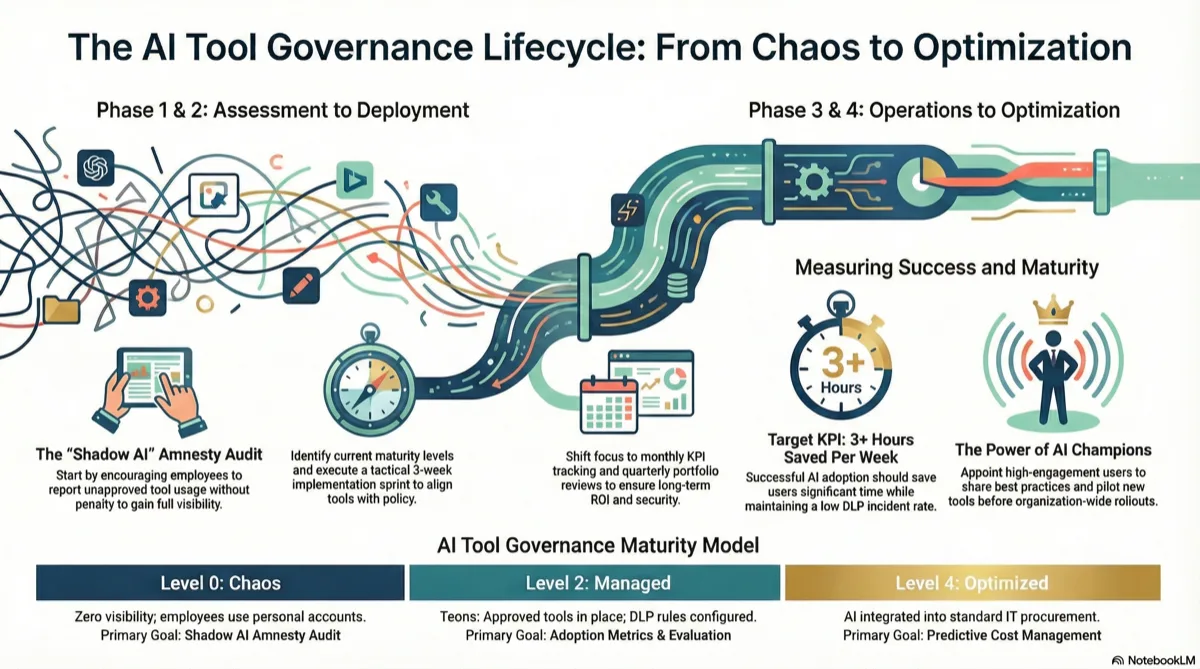
The Four Governance Phases
Most organizations jump straight to implementation and wonder why governance fails. The ones that succeed follow this complete cycle.
Assessment
Pre-Week 1
Implementation
Week 1-3
Operationalization
Month 2-6
Optimization
Ongoing
Assessment Phase
Before you touch a single tool or write a single policy, you need to know where you stand. I've seen organizations waste 6 months implementing the wrong framework because they skipped this phase.
AI Tool Governance Maturity Model
This is the diagnostic framework I use in every workshop. Find your level, then use the recommended actions to move up.
Chaos
Zero visibility into AI tool usage. No policies, no approved tools, no security controls. Employees using whatever they find.
Characteristics:
- • IT discovers AI tools through expense reports or security incidents
- • No one knows what data is being shared with AI services
- • Multiple teams using different personal ChatGPT accounts
- • Compliance has no AI usage documentation
→ Start with: Shadow AI amnesty audit
Reactive
Aware of shadow AI problem. Might have a "don't use ChatGPT" policy that nobody follows. No approved alternatives provided.
Characteristics:
- • Basic blocking rules on proxy/firewall (easily bypassed)
- • Security team responds to incidents after they happen
- • Employees know they "shouldn't" use AI but do anyway
- • No sanctioned tools offered as alternatives
→ Start with: Approved toolkit selection + amnesty program
Managed
Approved AI tools in place. Data classification policy exists. DLP rules configured. Training delivered. Most employees compliant.
Characteristics:
- • Enterprise AI tool licenses deployed
- • Green/Yellow/Red data classification understood
- • DLP monitoring AI traffic (flag mode, not block)
- • Exception request process exists
→ Start with: Adoption metrics + quarterly tool evaluation process
Measured
Tracking adoption, ROI, and compliance. Feedback loops operational. Tool portfolio optimized quarterly. Champions program active.
Characteristics:
- • Usage dashboards showing adoption by team and tool
- • ROI metrics tracked (time saved, costs reduced)
- • Regular user feedback collected and acted on
- • Internal champions promoting best practices
→ Start with: Advanced use case enablement + cost optimization
Optimized
AI governance integrated into broader IT governance. Continuous improvement culture. Predictive cost management. Industry-leading practices.
Characteristics:
- • AI governance part of standard IT procurement and security reviews
- • Automated compliance reporting and anomaly detection
- • Proactive cost forecasting and vendor negotiations
- • Organization viewed as AI governance leader
→ Start with: Publishing internal best practices externally
Organizational Readiness Checklist
Use this in workshops to identify blockers before you start. One "No" won't kill the initiative, but four or more means you need executive alignment first.
Executive sponsorship secured
Someone at VP+ level championing this initiative with budget authority
IT and Security aligned
CIO/CISO on board with approved tool approach (not blanket bans)
Budget allocated
$X per employee for enterprise AI tools (typically $20-50/user/month)
Training capacity available
Ability to deliver 2-hour manager training and 1-hour IC training to entire org
DLP/monitoring infrastructure exists
Already using Purview, Symantec, Forcepoint, or similar (if not, add 4 weeks)
Compliance requirements documented
Know which regulations apply (GDPR, HIPAA, SOC 2, etc.) and their AI implications
Change management support available
Someone to run comms, training, and adoption campaigns (HR, IT, or dedicated resource)
Stakeholder Mapping & RACI Matrix
Every governance initiative that fails does so because roles weren't clear. Here's who does what.
| Activity | Exec Sponsor | IT/Security | Compliance | HR/Training | Dept Heads |
|---|---|---|---|---|---|
| Budget approval | A | C | C | I | I |
| Tool selection | A | R | C | I | C |
| DLP rule config | I | R | A | I | I |
| Training delivery | I | C | C | R | A |
| Exception approval | I | C | C | I | R/A |
R = Responsible (does the work), A = Accountable (final decision), C = Consulted (provides input), I = Informed (kept in loop)
Implementation Phase (Week 1-3)
This is where the 3-week toolkit comes in. You've done the readiness work in Phase 1—now it's time to deploy.
Use the Shadow AI Governance Toolkit
The tactical 3-week implementation framework with all 7 templates: amnesty audit, IT discovery checklist, approved toolkit matrix, data classification, DLP rules, training outlines, and rollout comms.
Get the 3-Week ToolkitOperationalization Phase (Month 2-6)
The toolkit got you to launch. Now you need to make governance stick. Most failures happen here—organizations declare victory at Week 3 and stop measuring.
KPIs to Track (Month 2-6)
Don't track everything. Track these six metrics and you'll catch 95% of problems early.
Tool Adoption Rate
% of employees who logged into approved tools in last 30 days
Target: 70%+ by Month 3
DLP Incident Rate
Number of DLP flags per 1,000 employees per month
Target: <5 by Month 4 (should trend down)
Cost Per User
Total AI tool spend ÷ number of active users
Target: Trending down as you consolidate
Time Saved (Self-Reported)
Average hours saved per week via quarterly survey
Target: 3+ hours/week/user
Exception Request Volume
Number of requests for non-approved tools per month
Target: <10 per month (if higher, toolkit is incomplete)
User Satisfaction Score
1-10 rating via quarterly pulse survey
Target: 7+ average (if lower, tools aren't meeting needs)
Monthly Governance Review Agenda
30-minute meeting. Same time every month. Don't skip it.
KPI Dashboard Review
Review the 6 metrics above. Flag anything trending wrong direction.
DLP Incident Summary
Security reports noteworthy flags. Look for patterns (same team, same data type).
Exception Requests & User Feedback
Review tool requests. Are we seeing the same gap repeatedly? Time to add a new tool?
Cost Analysis
Finance reviews AI spend. Are we paying for unused licenses? Consolidation opportunities?
Action Items
Assign 1-3 specific action items with owners and deadlines. Review last month's items.
Quarterly User Feedback Survey (5 Questions)
Keep it short or nobody responds. These 5 questions tell you everything you need.
1. How many hours per week do you save using approved AI tools?
0 hours / 1-2 hours / 3-5 hours / 6-10 hours / 10+ hours
2. Which approved tool do you use most frequently?
[List your approved tools]
3. What's your biggest unmet need that current tools don't address?
[Free text, 100 char limit]
4. Rate your satisfaction with the approved AI toolkit (1-10)
1 = Very Dissatisfied, 10 = Very Satisfied
5. Are you using any AI tools NOT on the approved list? (Anonymous, no penalties)
Yes / No / [If yes, which ones?]
Optimization Phase (Ongoing)
You're measuring. Users are happy. Costs are predictable. Now you shift from governance as risk management to governance as competitive advantage.
Quarterly Tool Portfolio Review
Every 90 days, evaluate whether your toolkit still fits. AI moves fast—what was best in January might not be best in April.
Step 1: Usage Analysis
Pull login data for all approved tools. Calculate:
- • Active users (logged in last 30 days)
- • Inactive licenses (paying but not using)
- • Cost per active user
Decision point: If <40% license utilization after 6 months, cut the tool or reduce seats.
Step 2: Feature Gap Analysis
Review exception requests and user feedback. Are you seeing patterns?
- • Same capability requested 5+ times? Investigate adding that tool.
- • New use cases emerging? Evaluate whether existing tools can cover them.
- • Users building workarounds? You're missing something.
Step 3: Cost Optimization
Contact vendors with updated usage data. Renegotiate based on:
- • Actual seat count vs. contracted seats
- • Consolidation opportunities (can one tool replace two?)
- • Multi-year discounts if you're satisfied
- • Competitive quotes from alternatives
Reality check: I typically see 30-50% savings on renewal by showing usage data and competitor pricing.
Step 4: New Tool Evaluation
If user feedback suggests adding a new tool, run it through this filter:
- • Does it cover a use case none of our existing tools address?
- • Is the use case relevant to 20+ employees?
- • Does it meet our security/compliance bar?
- • Can we prove ROI in a 30-day pilot?
All four must be "yes" to add. Otherwise, table it for next quarter.
AI Champions Program Structure
Once governance is operational, shift from top-down enforcement to bottom-up enablement. Champions make this sustainable.
What Champions Do
- First point of contact for team questions about approved tools
- Share best practices and use case examples
- Surface feedback to governance team monthly
- Pilot new tools before broader rollout
How to Select Champions
- High engagement with approved tools (top 10% users)
- Respected by their teams (not necessarily senior)
- Volunteered during initial rollout
- One per department minimum (scale to 1 per 20 employees)
Time commitment: 2 hours per month. 1-hour monthly champion sync call + 1 hour answering team questions. Recognize them—profile in company newsletter, annual award, resume/LinkedIn fodder.
Decision Framework Library
These flowcharts answer the recurring questions that slow down governance. Print them, post them, make them accessible.
"Can I Use This AI Tool?" Decision Tree
Is it on the approved toolkit list?
→ YES: Use it freely for Green/Yellow data
→ NO: Continue to step 2
Does an approved tool already cover this use case?
→ YES: Use the approved alternative instead
→ NO: Continue to step 3
Will you only use it with Green data (public info)?
→ YES: Proceed (but still report usage to IT quarterly)
→ NO: Continue to step 4
Is this a one-time need or recurring?
→ ONE-TIME: Submit exception request to your manager
→ RECURRING: Submit new tool request with business case
"What Data Can I Share with AI?" Decision Tree
Is this publicly available information?
→ YES: Green data—use any approved tool
→ NO: Continue to step 2
Does it contain customer PII, financials, or proprietary code?
→ YES: Red data—requires approval. Stop and ask.
→ NO: Continue to step 3
Is it internal business data (not public but not highly sensitive)?
→ YES: Yellow data—use enterprise tools only (Team/Business plans)
→ NO: If unsure, ask IT or treat as Red
"How Do I Handle an Exception Request?" (For Managers)
Is this a one-time use for Green data only?
→ YES: Approve verbally. No formal process needed.
→ NO: Continue to step 2
Can an approved tool accomplish the same outcome?
→ YES: Redirect to approved tool. Offer to help with setup.
→ NO: Continue to step 3
Will this involve Yellow or Red data?
→ YES: Escalate to IT + Compliance for security review
→ NO: Continue to step 4
Is this a recurring business need (3+ other people would use it)?
→ YES: Forward to quarterly tool review for evaluation
→ NO: Approve as one-time exception with documentation
Workshop Facilitation Guide
Use this framework to run AI Readiness Workshops with clients, leadership teams, or cross-functional stakeholders.
2-Hour AI Governance Readiness Workshop Agenda
Opening: Why This Matters Now
Set the stage with real data. Use these talking points:
- • 75% of employees use AI tools at work (Microsoft 2024 study)
- • 78% use non-approved personal accounts (Gartner)
- • Average data breach costs $200K+ if AI tools involved
- • Organizations with AI governance save 40-60% on tool costs vs ad-hoc purchasing
Outcome: Everyone understands shadow AI is already happening and doing nothing is riskier than acting.
Interactive: Maturity Assessment
Walk through the Governance Maturity Model above. Ask participants:
- • "Show of hands—who's used ChatGPT for work in the last 30 days?"
- • "How many are using a personal vs. company account?"
- • "Do we know what data is being shared?"
Plot the organization on the maturity model together. Aim for consensus on current state.
Outcome: Shared understanding of where you are (usually Level 0-1). No shame—just facts.
Breakout: Stakeholder Mapping
Split into small groups (3-5 people). Assign each group a phase:
- • Group 1: Assessment Phase—what do we need to know first?
- • Group 2: Implementation Phase—who needs to be involved?
- • Group 3: Operationalization Phase—what metrics matter?
- • Group 4: Optimization Phase—how do we sustain this?
Each group uses the RACI matrix template to assign roles for their phase.
Outcome: Clear accountability for each phase before you start.
Interactive: Readiness Checklist
Go through the Organizational Readiness Checklist line by line. For each item:
- • Vote: Do we have this? (Yes / Partial / No)
- • If No or Partial: Who owns fixing it? By when?
This surfaces blockers in real-time. Don't skip items—acknowledge gaps honestly.
Outcome: A punch list of prerequisites with owners and deadlines.
Planning: Next Steps & Timeline
Based on maturity level and readiness, recommend a path:
- • If Level 0-1: Start with Assessment Phase. Assign amnesty audit owner. Set Week 1 kickoff date.
- • If Level 2: Skip to Operationalization Phase. Define KPIs and monthly review cadence.
- • If Level 3+: Focus on Optimization Phase. Launch champions program.
Build a 90-day roadmap together with specific milestones.
Outcome: Everyone leaves with a concrete plan and first action item.
Closing: Commitment & Questions
Go around the room. Each attendee commits to one action:
- • "I will [specific action] by [specific date]"
Document commitments. Schedule 30-day check-in before everyone leaves.
Outcome: Public commitments increase follow-through. Workshop becomes action, not just discussion.
Workshop tip: Print the Maturity Model, Readiness Checklist, and RACI Matrix as handouts. Make the workshop tactile—people remember what they write down more than what they hear.
Ready to Build Your Governance Pipeline?
This framework has helped organizations from 50 to 5,000 employees move from chaos to optimized AI governance. Whether you need help running the assessment workshop, selecting tools, or building sustainable governance, I can guide you through it.
Related Resources: